


IT support for mining companies. Who owns the trigger?
Date: 30 October 2026

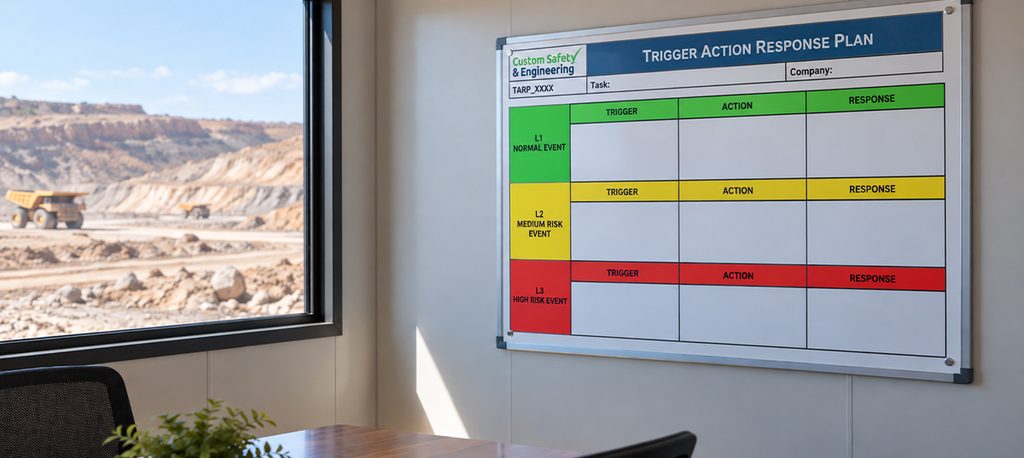
I've never walked into a site office without a TARP board. Gas, ground, fatigue, heat. There's a trigger level for all of it, and the shift supervisor knows exactly what happens when one trips.
Then I ask who owns the trigger for IT.
I get a blank look.
If you're the CFO and your IT feels fragile, trust that instinct. You've clocked the signals. You haven't had a trigger chart to read them against. Here's mine, and the point where IT support for mining companies needs to shift from break-fix to a specialist.
The short version
Three signals tell me when IT support for mining companies needs to move past break-fix. The same system keeps going down. Incidents take hours to contain, not minutes. And the CFO is the one fielding the calls. This article runs each signal through a simple trigger plan, green, amber, red, so you can tell a bad week from a pattern, then covers what yesIT's Managed IT Services picks up.
What's in here
What are the signs I should outsource IT support for my mining company?
There are 3. The same system keeps going down, incidents take too long to contain, and you're the one fielding the calls. One on its own is amber. All three at once is red.
One trigger on its own gets watched. Two at once get escalated. Here's what each one looks like on a mine site.
Why does the same IT system keep going down on my site?
Because it's being patched, not fixed. A restart gets the system back, but the reason it fell over never gets found.
Yeah, a one-off outage happens. A storm takes out a link, that's life on a remote site. But the same system, the same day of the week, the same fix? That's a pattern. A stretched internal team or a break-fix provider treats each one as a fresh emergency. The ticket gets closed. The question of why never gets asked.
The 40-minute fix that cost three hours
Picture a mine with one site office and a break-fix IT provider on call. Every Monday morning, the weighbridge software crashes after a weekend update. Trucks queue at the gate. The provider logs in remotely, restarts the software and closes the ticket. Forty minutes, sorted. After four Mondays, that's close to three hours of trucks sitting idle, and the cause still hasn't been found.
How long is too long for my IT incident response?
Measure how long production, safety systems or site comms are down, not whether it gets fixed.
Your provider will get it fixed. That's not the test. Set the trigger on how long you're down, not on the fix. On a mine site, the clock that matters is the one running while dispatch is dark or the gas monitoring feed drops off the control room screen. A delay out here isn't a lost afternoon. It's trucks parked, a safety system blind and a crew on standby.
The ASD's Annual Cyber Threat Report puts the average self-reported cost of cybercrime for a medium business at $97,200 per report. If your response plan is the site admin ringing the break-fix provider and waiting, that's already red.
Why do I keep getting pulled into IT problems as CFO?
Because the escalation path ends at your desk. That's a structural gap, not a delegation problem.
A CFO said to me last year, "I didn't sign up to be the IT escalation point." He was chasing updates and approving after-hours callouts. None of that meant he should delegate harder. The setup had no escalation point below him. You'd never be first responder on a gas alarm. Your IT shouldn't be any different. And that cost doesn't show up in the IT support budget. It shows up in your week, in hours not spent on cash flow or the board pack.
How do I tell a bad week from a reason to outsource?
One bad week points to a process you can fix. When downtime, response time and your own time all trip at once, that's the signal.
A rough fortnight doesn't mean you chuck your provider. Fix the process and move on. What I look for is all three signals trending the same way over a quarter.
3 trigger levels for IT support
Green: A one-off outage, fixed fast, cause found. I log it and keep going.
Amber: The same system down twice, or I've been pulled in once. I ask for a root cause and set a review date.
Red: Repeat outages, slow containment, and I'm fielding the calls. I bring in a specialist

What does yesIT's Managed IT Services cover for my mining operation?
Proactive monitoring, a dedicated IT expert and guaranteed fast response times, in two packages built for mining and energy.
Switching providers doesn't change your site. It changes who holds the trigger when the weighbridge or dispatch drops out. Here are the IT services mining operations lean on every shift.
24×7 infrastructure monitoring catches the Monday weighbridge the second time, not the fourth. A dedicated IT expert paired with your business means the escalation stops with them, not you. Guaranteed fast response times are written into the service, not left to goodwill.
SmartOffice covers Tier 2 and Tier 3 mining and energy operations, and SmartOffice Secure adds CounterGuard security for Tier 1. Remote site connectivity sits with yesConnect, and remote site visits are scoped separately. For crews across sites, see how integrated IT security supports remote workforces.
Summary
A TARP only works when a named person owns the trigger, the way the Geotech owns slope monitoring. Watch three things, the same system going down, how long your site's dark, and how many times your phone rang about it this quarter. If all three are tripping, you're past amber, and that's the gap good mining IT services close.
Ask yesIT who'd own the trigger on your IT, and what happens the moment it trips.
FAQs
Can I outsource part of my IT support and keep the rest in-house?
Do I need an internal IT person before I switch to a managed provider?
How long will my handover to a managed provider take?
Send us a message!
Fill out the form below and we will be in contact with you within 24 hours.